Pre-release for macOS
The Arc you know, but better.
ReArc is a drop-in replacement for Arc. It moves your spaces over in one step, it gives each space its own container if you want one, it doesn't need an account, and it's faster than Arc on every action we measured.
But... we'd love you to help us make this platform one of our supported ones. Contribute to the project.
View on GitHubMeasured
Faster than Arc on every action we timed.
- Switch space⌥⌘→
- Switch tab⌘1–9
- Ctrl-Tab switcher⌃⇥
- Show sidebar⌘S
- Hide sidebar⌘S
- Open command bar⌘T
- Address bar⌘L
- Close command barEsc
Median time from key press to the window changing on screen, timed the same way in both apps. A switched-to space settles in 165 ms. Arc's takes 334 ms.
One step
Move from Arc in one step.
File › Import, or the first-run onboarding, brings over your Arc spaces, pinned tabs, folders, favorites and some settings. Bookmarks and history come from Chrome or Brave.
Containers
A different account in every space.
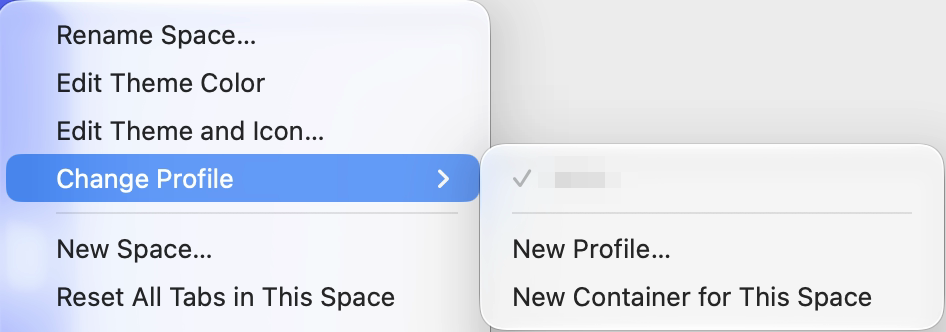
ReArc supports containers: its own sign-ins for one space, inside a profile. Give a space a container and the same site can be signed in to a different account in each space, like your work Salesforce in Work and another account in your side-project space, both at once.
Choose New Container for This Space and the space stays where it is, in its profile, and every tab in it shows the container's name in a chip. Settings › General › New spaces can give every new space its own.
Private by design
No account.
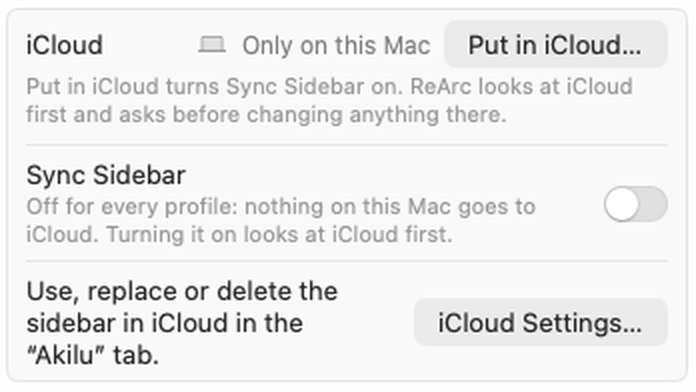
Sidebar sync uses your own iCloud, not an Arc login. Nothing goes to a browser company's servers.
When ReArc checks for updates, our server counts the check. It keeps no IP address. Installs are counted with an anonymous id that changes every week.
Open source
It's yours.
The code is open source, so you can change anything. And ReArc doesn't depend on another company deciding to keep developing it.
Your side
Sidebar on the left or the right.
Settings › General › Sidebar position. Everything that depends on the side flips with it:
- the ⌘S slide and the edge-hover peek
- the Library and the resize handle
- hover previews and the downloads list
New in the engine
Extension side panels.
Extensions like Claude and ChatGPT can open their Chrome side panel next to the page. ReArc's engine got new support to make this work.
- Resizable, and it remembers its width
- Stays put when you switch tabs
- Each tab can keep its own panel
Built for scale
Made for huge download histories.
With 39,000 downloads, the first download freezes the app for 0.05 s, and the downloads list scrolls smoothly.
Still Arc at heart
Everything else, where you left it.
Most of ReArc matches Arc on purpose. These work the way you're used to:
- Split View
- Little Arc
- Boosts
- The Library
- Side panel
- Settings
Arc's AI features are left out on purpose: Settings › Max is back, and none of it is AI, just small scripted helpers. ReArc itself runs no AI.
Try the pre-release on macOS.
ReArc is in pre-release. The Arc you know, but better.
But... we'd love you to help us make this platform one of our supported ones. Contribute to the project.
See what's newReFocused · ReStored · ReArc